







Workforce scheduling often appears to begin with a simple administrative question: who should work which shift?
Managers look at the employees available, the roles that need to be covered and the shifts that need to be filled. They then arrange those resources into a workable roster. When every shift has a name against it, the schedule appears complete.
But a completed schedule does not necessarily mean the right workforce capacity has been scheduled.
Consider this for example:
A hotel that prepares Friday’s roster using its normal occupancy pattern. Every shift is filled and 50 employees have been assigned, so the schedule appears complete. Then a conference group confirms a late booking that will bring hundred additional guests into the hotel the next day. Unless the expected increase is reflected in the workforce plan, the hotel may enter its busiest period with too few banquet servers, kitchen staff or front-desk employees. The problem is not that the roster has empty positions. It is that the roster was completed before the coming workload was properly understood.
The underlying issue is that employee assignment is only the final part of the scheduling decision. Before deciding who should work, managers need to understand how much demand the business expects, what workforce that demand requires, and which roles need to be present at particular times.
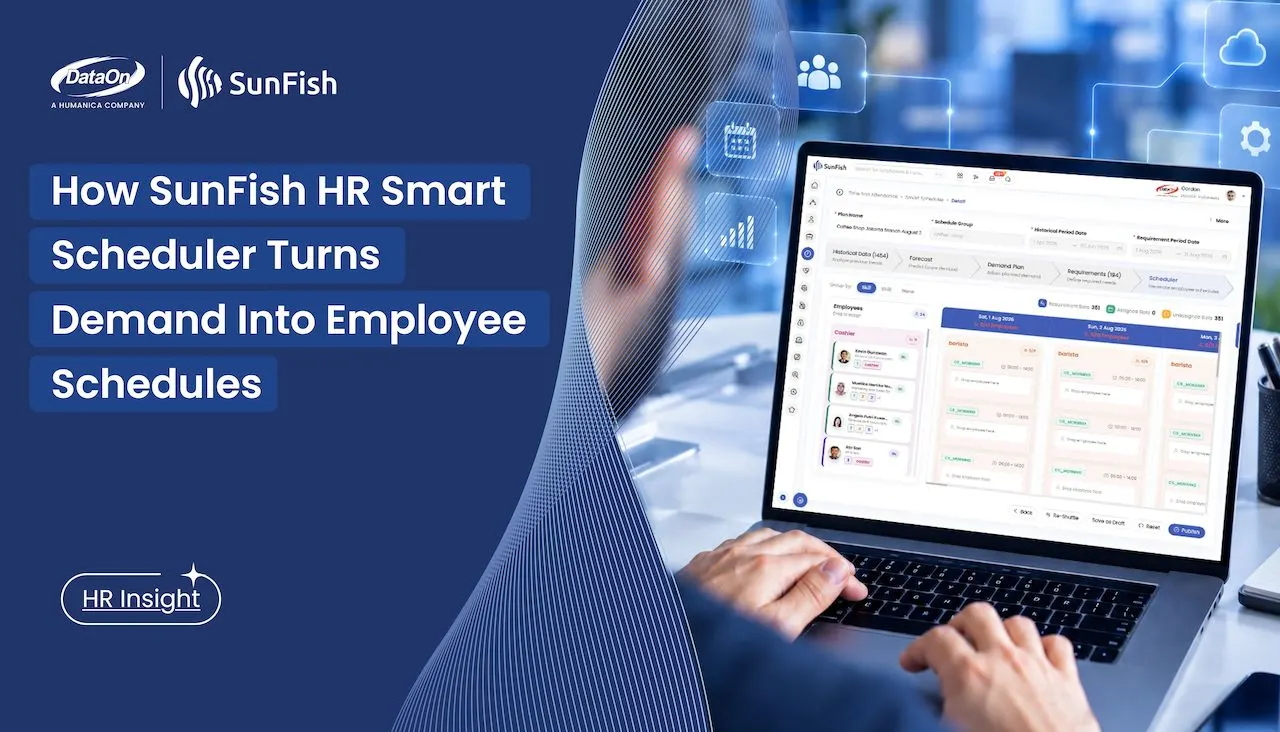
SunFish HR Smart Scheduler was introduced in the Q2 2026 release to connect those decisions in one planning process. It uses historical demand to forecast what may happen next, lets managers adjust that forecast using current operational knowledge, translates the resulting demand plan into workforce requirements, and then uses AI to generate an employee schedule for review.
The result is not simply a faster way to fill empty shifts. It is a more structured way to move from expected business demand to a roster the operation can use.
Scheduling Should Begin Before Employees Are Assigned
In a conventional scheduling process, managers often begin with the people and shifts already in front of them:
Available employees → Fill shifts → Publish roster
Smart Scheduler begins further upstream:
Historical demand → Forecast → Demand plan → Workforce requirements → Employee schedule
This changes what the roster represents. Instead of treating the schedule as the planning process, it becomes the output of a planning process.
That distinction matters most in businesses where the amount and type of work can change from one day, shift or location to another. A retailer may need additional coverage during a flash sale. A grocery store may face a weekend rush or stock event. A hotel may have an ordinary occupancy pattern interrupted by a conference and late bookings. A restaurant may need very different coverage during meal periods. A manufacturer may need to respond to a confirmed order, a maintenance shutdown or changing production requirements.
The operational measure of demand will differ between businesses. It may be related to sales, store traffic, production volume, reservations, bookings or another measure that reflects workload. The planning principle remains the same: workforce requirements should be related to the work the organization expects to perform.
Historical patterns are useful because they give managers evidence of how demand has behaved before. They do not know everything about what will happen next. A forecast cannot automatically anticipate every promotion, event, disruption or management decision. Smart Scheduler therefore combines automated analysis with a point at which managers can apply information that is not visible in the historical record.
Creating a Smart Scheduler Plan
Each Smart Scheduler process begins with a plan. The manager identifies the plan, selects the workforce to be scheduled and defines the periods the system should analyze and prepare. Each plan applies to one schedule group and one target period. In a multi-location retail operation, for example, separate plans may be created for each branch and week rather than combining every location into one generalized roster.
The plan contains four basic inputs:
| Name | identifies the scheduling plan. |
| Schedule Group | identifies the group of employees included. The group and its assigned employees must already exist before the plan is created |
| Historical Period Date | defines the previous period whose demand records will be analyzed. |
| Requirement Period Date | defines the future period for which workforce requirements and schedules will be prepared. |
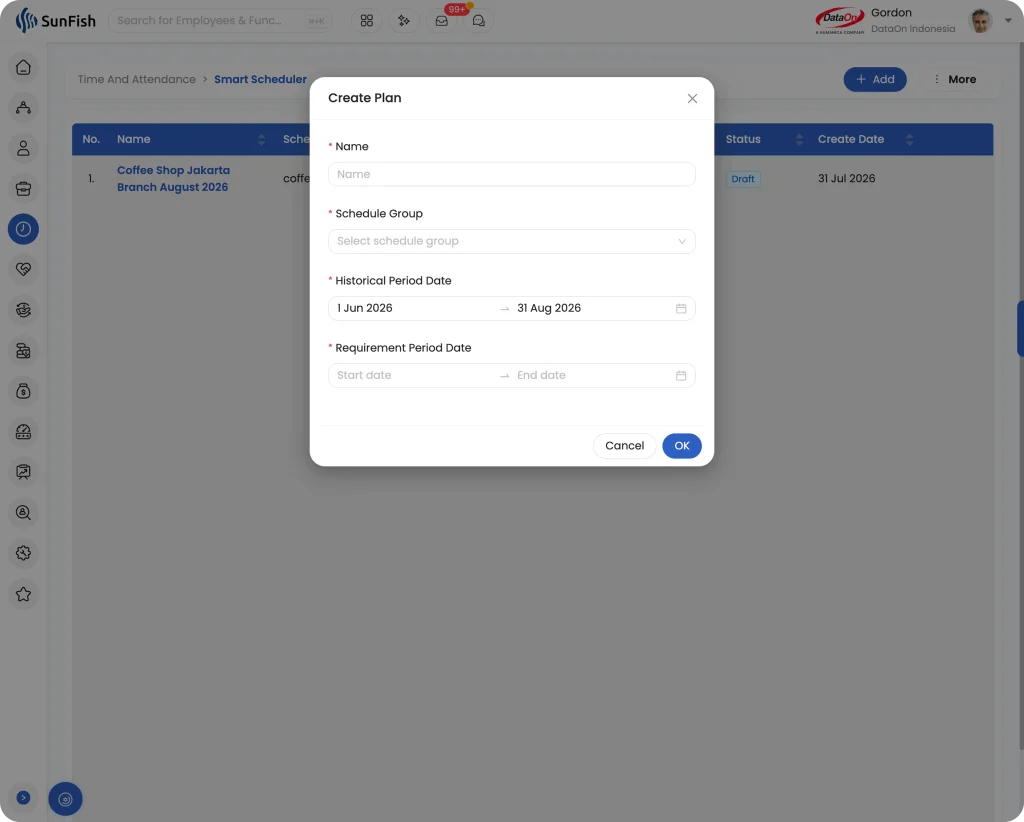
The plan also carries a visible status, such as New, Draft or Published. Creating the plan, generating requirements or producing a proposed roster does not immediately send anything to employees. The plan remains a management workspace until an authorized user chooses to publish it.
Separating the historical and requirement periods is important. The system needs to know which experience it should learn from and which future period management is trying to plan. A business preparing next week’s roster, for example, may select an earlier period that provides a meaningful basis for understanding its demand pattern.
Once the plan is created, the manager moves through five connected stages: Historical Data, Forecast, Demand Plan, Requirements and Scheduler. Each stage answers a different operational question.
Historical Data Shows How Demand Behaved
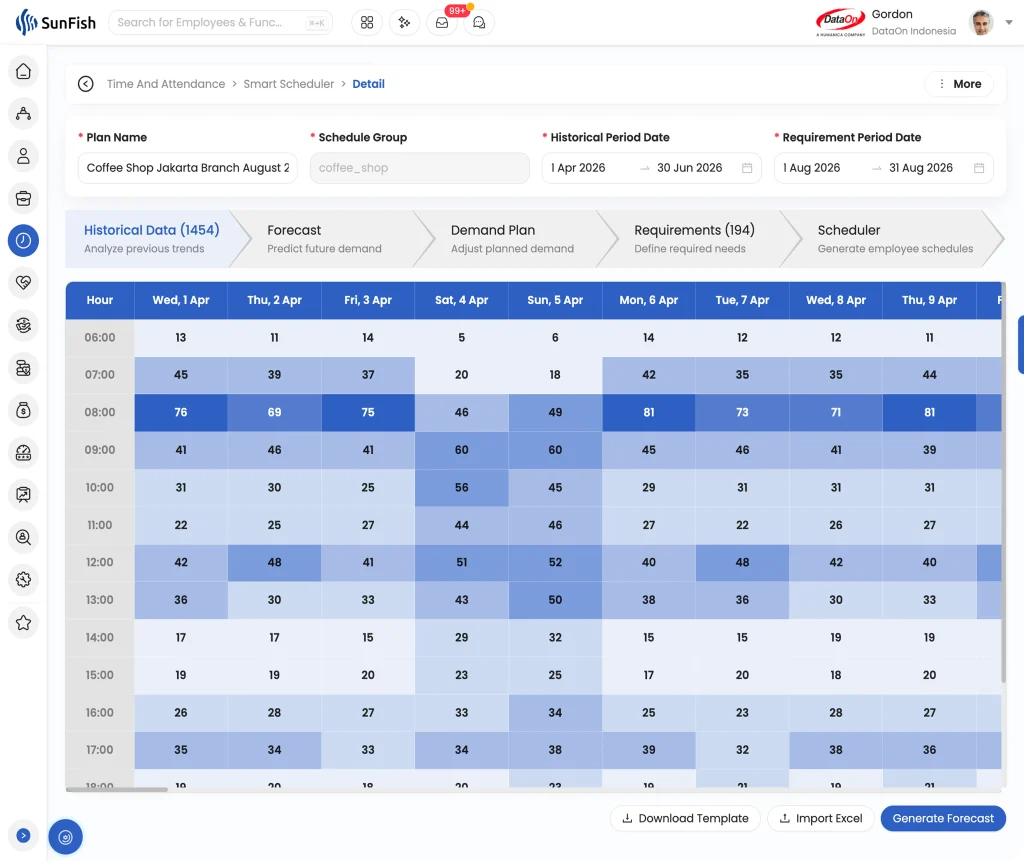
The Historical Data stage analyzes demand records from the period selected when the plan was created. It provides the starting evidence for the planning process.
This stage is more than a copy of the previous roster. The purpose is to understand the pattern of operational demand before deciding what the future workforce should look like. Depending on the organization, that pattern may vary by day, time, location, role or shift.
Selecting an appropriate historical period requires judgment. A normal trading week may be more useful for planning another normal week than a period affected by a major holiday. A comparable production cycle may provide a better basis than the immediately preceding dates. If the historical period does not represent the operation being planned, the forecast may begin from the wrong baseline.
Smart Scheduler makes the analysis available inside the same process where the future plan will be created. The manager does not have to move directly from an old roster to a new one or reconstruct demand patterns manually before beginning the schedule.
Forecast Estimates What May Happen Next
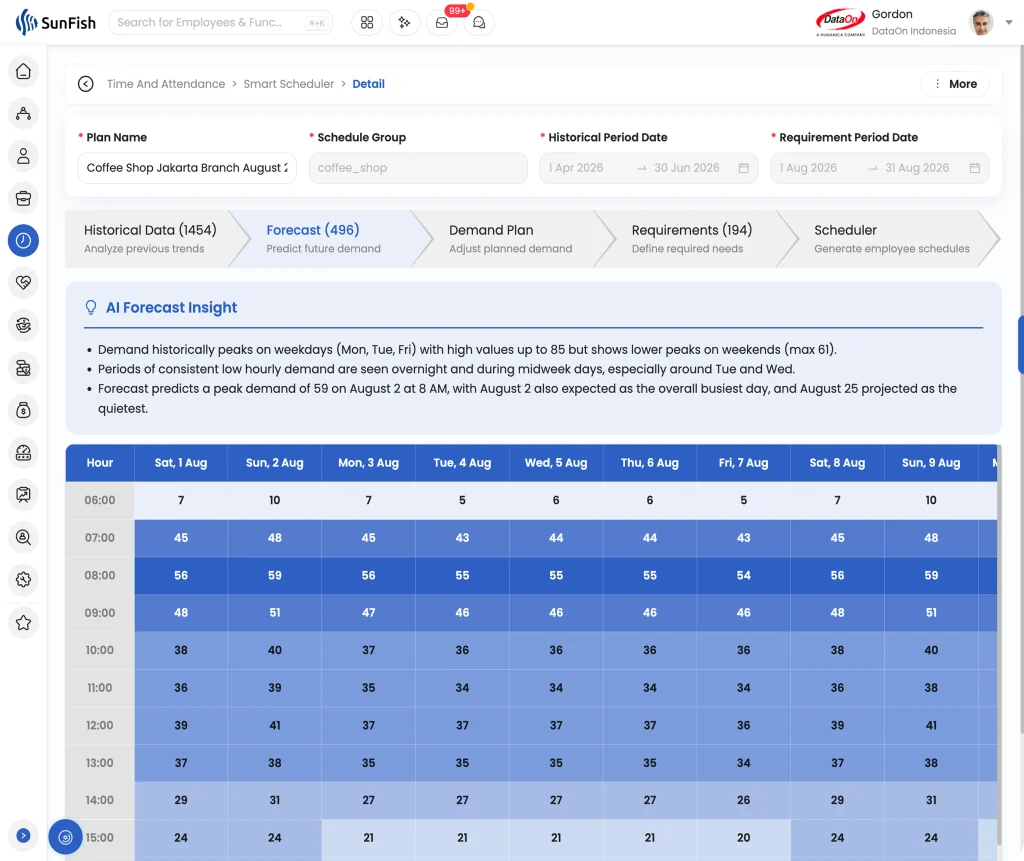
The Forecast stage uses the historical analysis to predict demand for the requirement period.
This gives the manager an initial view of the workload the organization may need to support. Rather than beginning with an empty schedule and relying entirely on memory or intuition, the manager begins with a demand estimate based on previous operational patterns.
Forecasting does not remove uncertainty. Historical data can identify recurring patterns, but it cannot know every condition that will affect the coming period. Its value is to provide a consistent analytical starting point. Managers can then focus their attention on where the future is likely to differ from the past.
This is particularly valuable when managers are responsible for many employees, roles or operating periods. Manually identifying patterns across all of those combinations takes time, and important variations can be easy to miss. The forecast organizes that information before individual employee assignment begins.
The Demand Plan Adds Current Operational Knowledge
The Demand Plan is where the manager reviews the forecast and adjusts the expected demand before it becomes the basis for workforce requirements.
This stage recognizes that the people closest to the operation may know something the historical information cannot show. A hotel manager may know that a conference will change restaurant and banquet activity. A retailer may know that a promotion is expected to increase traffic. A manufacturer may have a large confirmed order or planned maintenance that changes the workforce needed on a particular line.
The historical pattern remains useful, but it does not have the final word. Smart Scheduler presents the forecast as an input to management rather than an instruction that must be accepted unchanged.
This review point also makes responsibility clear. The system can process the historical information and produce a forecast. Management determines whether the resulting demand plan reflects what the business currently expects.
The adjustment is also retained as part of the plan. That creates a useful basis for later review: when the period has passed and actual demand is known, the organization can examine whether the original forecast or the manager’s intervention was closer to what occurred. Human judgment is therefore not applied invisibly. It becomes part of the planning record and can help improve future decisions.
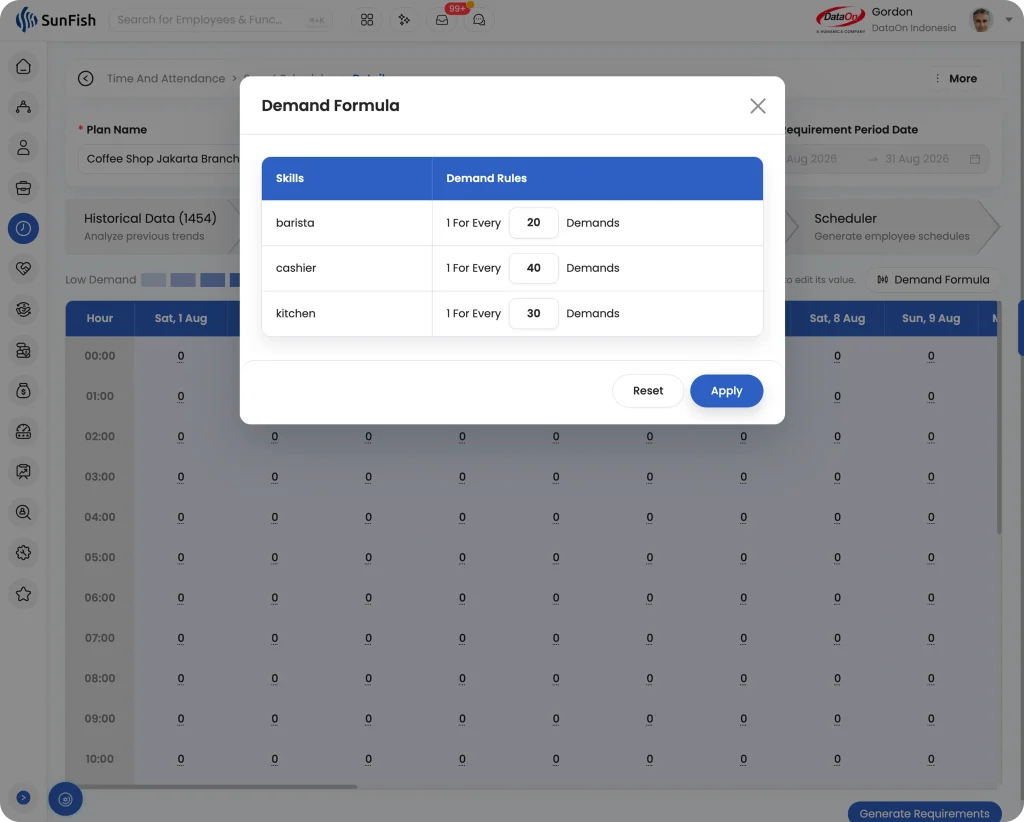
Requirements Translate Demand Into Roles and Shifts
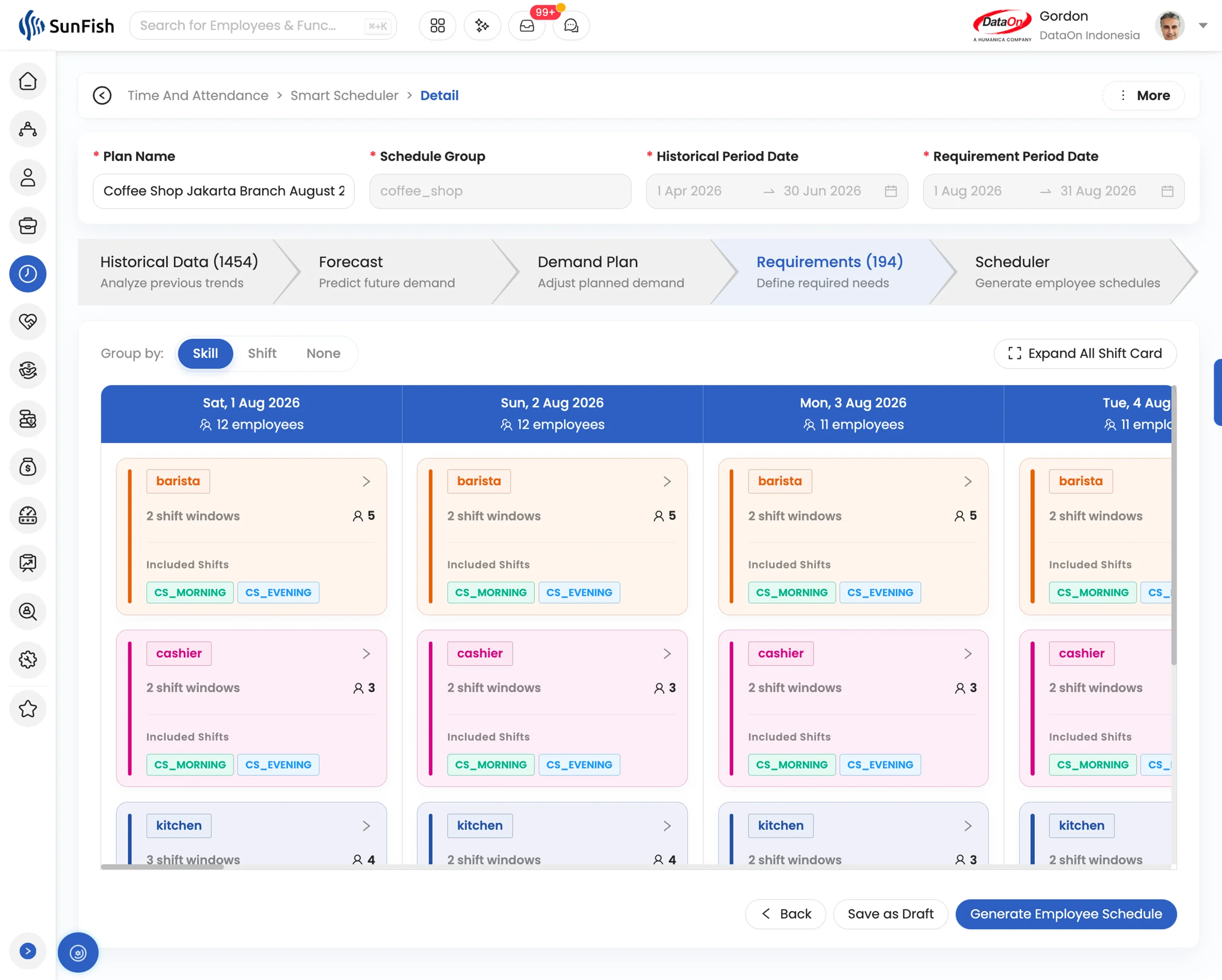
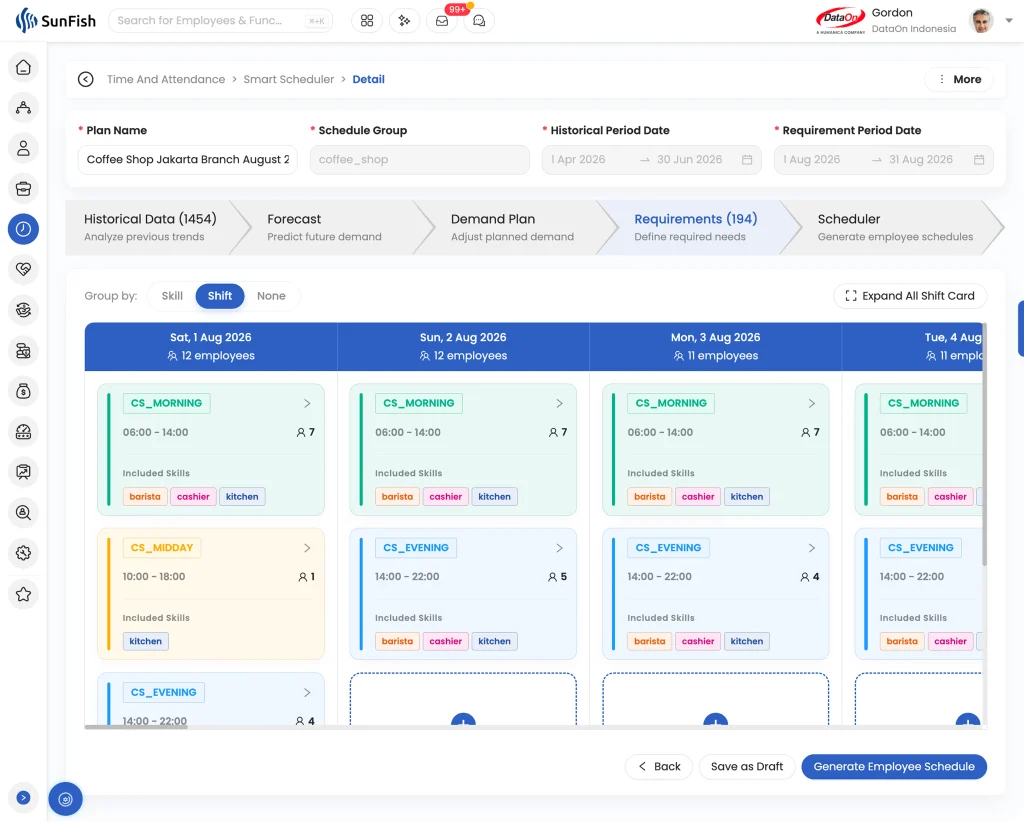
Once the demand plan has been reviewed, the Smart Scheduler automatically generates the corresponding workforce requirements. The Requirements stage shows the number of employees needed by day, role and shift window for the target period.
This is the bridge between operational demand and the employee roster. A general expectation that a location will be busy is not yet a usable staffing plan. Managers need to know how that workload changes the number and type of people required at different times.
The role distinction is especially important. Ten available employees do not provide the required coverage if the operation needs a particular combination of roles. In a coffee shop, for example, a shortage of baristas is not offset by having surplus cashiers. Averaging the two together may make total staffing appear sufficient while the customer queue continues to grow. A restaurant may require different numbers of kitchen, service and cashier employees during a peak period. A hotel conference may affect banquet, housekeeping and food-and-beverage requirements differently. A production increase may require capacity in specific positions rather than an equal increase across the entire workforce.
Managers review the automatically generated requirements before proceeding. If the proposed numbers do not reflect operational reality, they can return to the demand plan, make the necessary adjustment and regenerate the requirements. Employee schedules are created only after the workforce requirement has been confirmed.
AI Generates a Proposed Employee Schedule
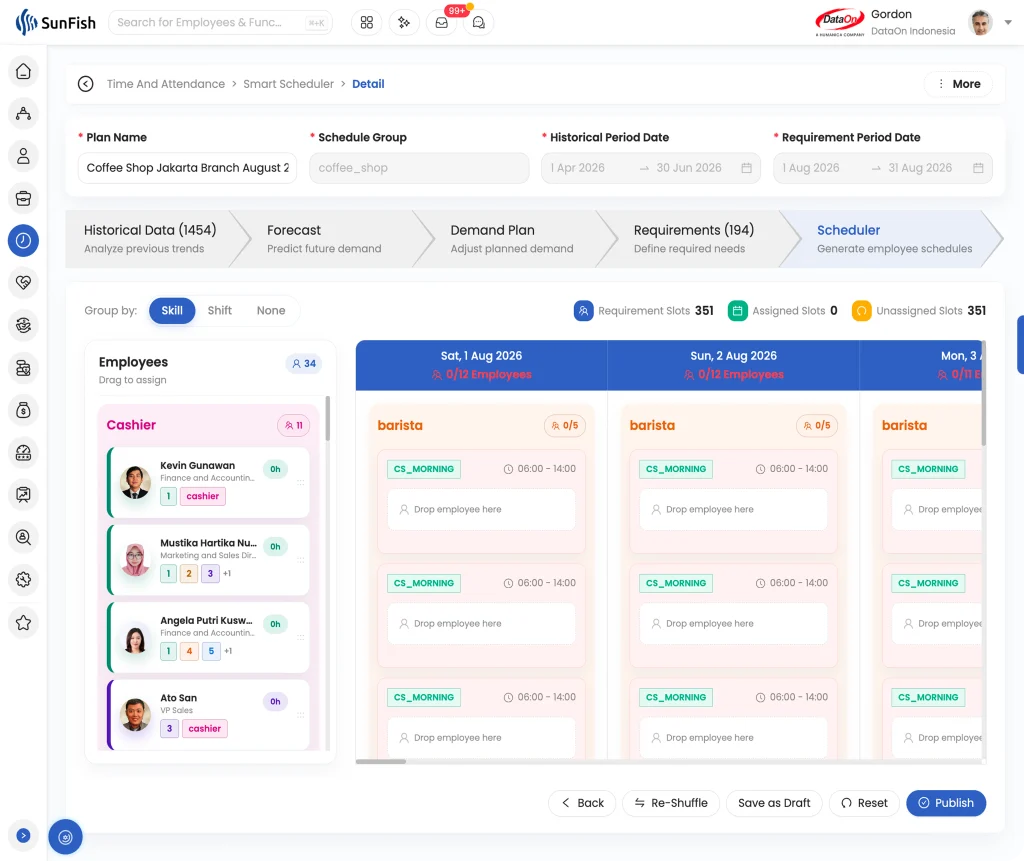
The Scheduler stage converts the confirmed requirements into individual employee assignments.
SunFish’s Smart Scheduler uses AI to generate the proposed shifts while considering the employees in the selected schedule group, their roles, applicable shift rules, approved leave, working hours and recorded preferences. It also seeks to balance the workload so that employees are not assigned disproportionately high or low hours.
This is where much of the manual effort in traditional scheduling can be reduced. Instead of constructing every assignment one employee and one shift at a time, the manager receives a proposed schedule generated from the requirements already established in the earlier stages. The generation itself can be completed in seconds. The manager’s role changes from authoring the entire roster to editing and approving a draft that already reflects the planning inputs available to the system.
The schedule still remains visible and editable. Managers can review employee working hours and inspect how the required shifts have been distributed. If a particular assignment needs to change, shifts can be moved manually using drag and drop. If the manager wants the system to produce a different allocation, Reshuffle regenerates the schedule automatically.
Once the manager is satisfied that the roster is workable, Publish applies the generated shifts and makes them available to employees. Reshuffling, dragging a shift or saving a draft remains part of the management process. Publish is the deliberate action that commits the roster.
The sequence is deliberate. AI generates a recommendation; it does not bypass management review. The manager remains responsible for checking the result against circumstances that may not be fully represented in the system.
A Practical Example From Forecast to Published Roster
Consider a hotel preparing its schedule for the following week.
The manager creates a plan, selects the hotel’s schedule group, chooses a relevant historical period and enters the dates to be scheduled. The Smart Scheduler analyzes the earlier demand records and produces a forecast for the target week.
Most days resemble the historical pattern, but the hotel has confirmed a conference on Thursday. The manager knows this will increase banquet and food-and-beverage activity beyond what the historical forecast indicates. In the Demand Plan, the manager adjusts Thursday’s expected demand to reflect that information.
The Smart Scheduler then translates the revised plan into workforce requirements by role and shift. The requirements may show that the hotel needs additional banquet service and kitchen coverage during particular hours, while requirements elsewhere remain close to the original forecast.
After reviewing those numbers, the manager proceeds to the Scheduler. The system generates employee assignments from the confirmed requirements, using the roles, working hours and preferences recorded for employees in the schedule group. The manager reviews the allocation, moves one shift to reflect a circumstance known by the department, and checks the resulting working-hour balance.
If the overall allocation still does not look right, the manager can use Reshuffle to generate another schedule. When the result reflects the hotel’s operational needs, the manager publishes it.
The example illustrates the purpose of the complete workflow. Historical information provides evidence. Forecasting provides an initial expectation. The manager contributes current knowledge. Requirements define the necessary workforce. AI handles the complex employee allocation. Management reviews and approves the result.
Better Scheduling Depends on Good Operational Information
SunFish’s Smart Scheduler can automate analysis and employee allocation, but it still depends on the way the organization represents its operation inside the system.
The schedule group must contain the appropriate employees. Roles need to reflect the work those employees can perform. Working-hour information, approved leave, relevant shift rules and preferences need to be maintained. The historical period should provide a meaningful basis for the future period being planned. The demand plan needs to include relevant information management has about upcoming conditions.
If those elements are incomplete or inaccurate, an automatically generated roster may still fail to match the operation. AI does not make workforce fundamentals less important. It makes the relationship between those fundamentals and the resulting schedule more visible.
This is also why manager review is built into several points in the process. Managers review the demand plan, confirm the workforce requirements, inspect individual employee schedules and decide when the result should be published. Automation reduces the work required to produce the plan, while the organization retains control over the assumptions and final decision.
Where SunFish’s Smart Scheduler Creates the Most Value
The SunFish Smart Scheduler is particularly relevant where workforce needs change frequently or where schedules involve many employees, roles, shifts or locations.
For operations, connecting demand with staffing can improve the likelihood that the required roles are present when workload rises. Better coverage can support service delivery and reduce the operational pressure created when a full roster still lacks the capacity or role mix the business needs.
For management, automatic forecasting, requirement generation and schedule creation reduce the time spent assembling and repeatedly rebuilding rosters. Managers can spend more of their effort reviewing the assumptions, responding to exceptions and making decisions that require local knowledge.
The difference can be material at scale. In one retail group operating 140 outlets, roster preparation was reduced from approximately two days per month for each area manager to under three hours. The result reflects that organization’s operating environment and should not be treated as a universal benchmark, but it illustrates what can change when managers begin with a generated draft instead of rebuilding every roster manually.
For labor-cost control, the process gives managers a clearer basis for comparing scheduled capacity with expected demand. It can help identify where too many hours are being committed as well as where too little capacity may lead to workload pressure or overtime.
For employees, considering roles, working hours and preferences during schedule generation can support a fairer distribution of hours. Managers also retain the ability to examine the proposed allocation before it becomes the published roster.
The value will not be identical in every organization. A small workforce with fixed working patterns may already be straightforward to schedule. The benefit becomes more significant as demand varies and the number of possible employee assignments grows. Retail networks, hotels, restaurants, grocery operations, manufacturing sites and other shift-based businesses are likely to see the planning problem most clearly.
Closing: From a Filled Roster to a Planned Workforce
Employee scheduling will always end with a practical result: people need to know when they work, managers need the required coverage, and the organization needs a roster it can execute.
SunFish’s Smart Scheduler changes how that result is reached. It begins with evidence of demand, develops a forecast, gives managers room to adjust the plan, translates expected demand into requirements by day, role and shift window, and uses AI to create employee assignments. Managers can review hours, move shifts, regenerate the allocation and publish only when the schedule reflects operational reality. The human moves from roster author to roster editor, while retaining control over the assumptions and the decision to publish.
This approach does more than accelerate roster preparation. It connects the schedule to the business conditions the workforce is expected to serve.
That is the direction introduced in the SunFish HR Q2 2026 release: the system recommends, and the manager decides.
Customers who would like to explore our Smart Scheduler, including feature availability, data readiness and implementation requirements, can contact their DataOn account manager or the DataOn team.